Shipping real-time features with SSE and TanStack Query
Two features I recently shipped — an in-app notification bell and a report-generation status modal — both needed updates pushed from the server the moment they happened. Originally, we used Supabase Realtime to listen for column changes on the tables we cared about. But after migrating our database off Supabase to a different one, that option was gone, and the team settled on SSE instead. I was genuinely excited to pick up a new real-time pattern — let's dig in together.
What SSE actually is
The two other common ways to get updates from a server are polling (the client asks every N seconds — wasteful when nothing changes) and WebSocket (full duplex, but overkill when the client doesn't need to talk back). SSE sits between them: one direction, plain HTTP, no new protocol to add to the stack.
The wire format
An SSE endpoint responds with Content-Type: text/event-stream and, instead of closing the connection after the body, keeps it open. What flows through is plain text, structured as frames separated by blank lines. Each frame is a set of one-per-line fields:
event:— the event name (optional; defaults to"message")data:— the payload (a string; stringify JSON if need structure)id:— an identifier the browser remembers for reconnectretry:— a hint, in milliseconds, for how long the browser should wait before reconnecting
Here's what a raw response looks like on the wire:
HTTP/1.1 200 OK
Content-Type: text/event-stream
Cache-Control: no-cache
Connection: keep-alive

id: 1
event: badge
data: 3

id: 2
data: {"id":"n_42","title":"Your submission was approved","body":"Your submission is now live."}

id: 3
event: badge
data: 4
Three frames. Two are badge events; the middle one has no event: field, so it's dispatched as the default "message" event. The data: payload is always a string — if you want an object, you stringify on the server and JSON.parse on the client.
The EventSource API
Browsers ship a built-in client for SSE called EventSource. Point it at a URL and register handlers:
// relative URL → same origin as the page, like fetch
// cross-origin API: pass the full URL and enable CORS on the server
const stream = new EventSource("/notifications/stream")

stream.onopen = () => {
  console.log("connected")
}

stream.onmessage = (event) => {
  // fires for frames with no `event:` field
  const notification = JSON.parse(event.data)
  // ...
}

stream.addEventListener("badge", (event) => {
  // fires for frames with `event: badge`
  const count = Number(event.data)
  // ...
})

stream.onerror = () => {
  // the browser will auto-reconnect after this
}

// when you're done
stream.close()
What the browser handles for you
- Parsing the wire format into
MessageEventobjects - Dispatching each frame to the right handler based on its
event:field - Auto-reconnecting when the connection drops, waiting the number of milliseconds hinted by the last
retry:field it saw (default: about 3 seconds) - Tracking
lastEventId— every time a frame arrives with anid:field, the browser stores it. On reconnect, the browser sends it back in aLast-Event-IDheader.
What the server has to do
- Set
Content-Type: text/event-streamand send each event to the client the moment it's written, instead of accumulating multiple events before sending - Optionally emit
retry:to control the reconnect delay - Optionally emit
id:on each frame if you want the browser to sendLast-Event-IDon reconnect - Decide what to do with
Last-Event-IDwhen it comes in. Replay events after that id? Send a fresh snapshot? Ignore it?
The auth caveat
Both my case studies below need Authorization, so I use @microsoft/fetch-event-source. The mental model is the same as native EventSource; only the API surface differs.
Case study 1 — Notifications (persistent stream)
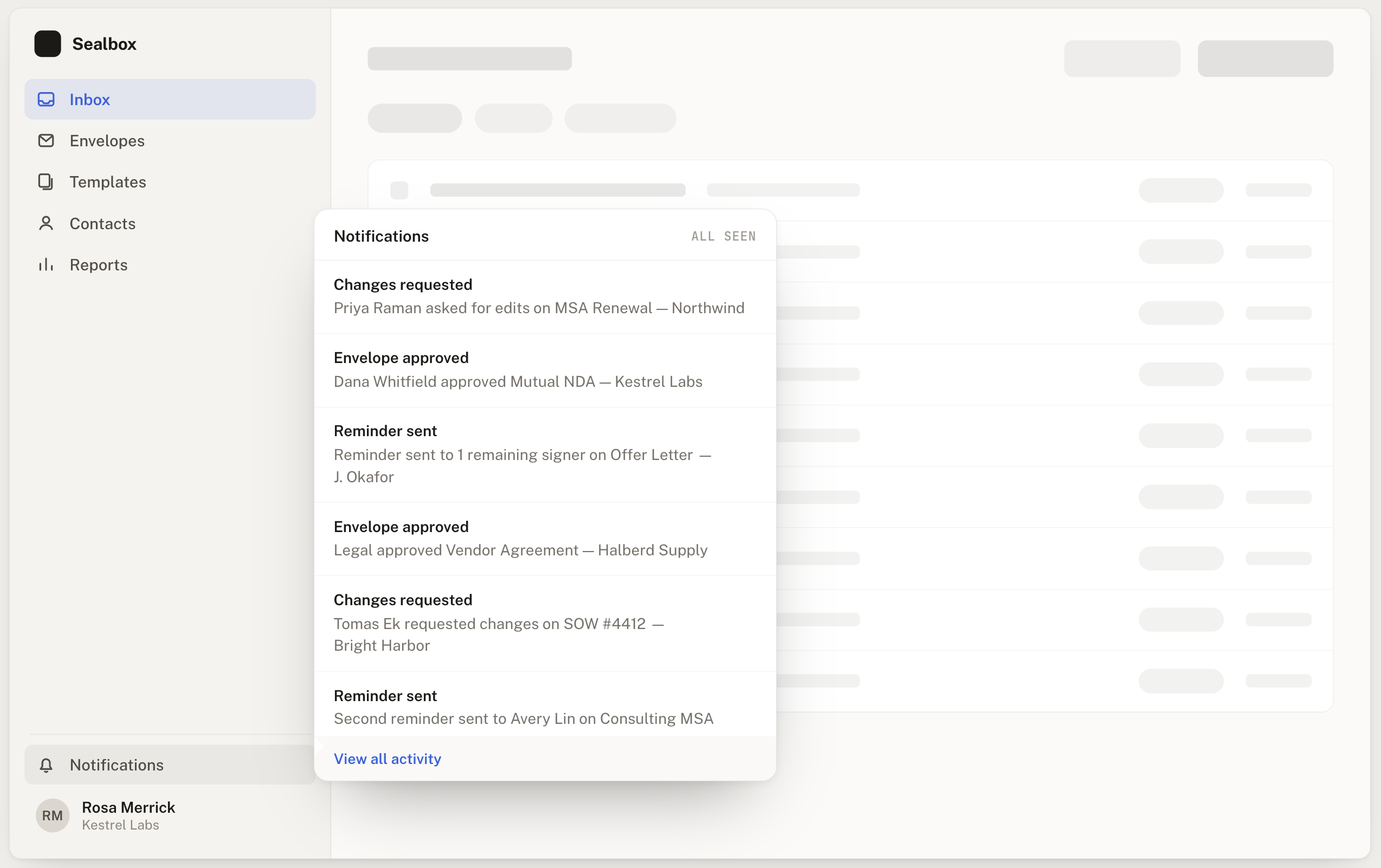
The first feature is a notification bell in the sidebar. When something happens on the server that concerns the current user — an envelope gets approved, someone requests changes, a reminder is sent — a notification arrives in real time. The bell shows an unread count; opening the panel lists the notifications newest-first.
Two frame types
The server emits two shapes over the stream:
event: badgewith a numericdata:— the current unread count. Sent whenever the number changes on the server side.- Default event (no
event:field) with a JSONdata:— a new notification record.
The hook
The stream stays open for the entire workspace session. It never has a "job done" moment — as long as the user is logged in, we want it connected.
const RECONNECT_DELAYS_MS = [1_000, 2_000, 5_000, 10_000]

type StreamStatus = "idle" | "connecting" | "connected" | "reconnecting" | "error"

function useNotificationStream(enabled: boolean) {
  const queryClient = useQueryClient()
  const [status, setStatus] = useState<StreamStatus>("idle")

  useEffect(() => {
    if (!enabled) return

    let attempt = 0
    let reconnectTimer: ReturnType<typeof setTimeout> | undefined
    const abort = new AbortController()

    const connect = async () => {
      setStatus(attempt === 0 ? "connecting" : "reconnecting")
      try {
        await fetchEventSource("/notifications/stream", {
          signal: abort.signal,
          openWhenHidden: true,
          headers: { Authorization: `Bearer ${await getAccessToken()}` },
          onopen: async () => {
            attempt = 0
            setStatus("connected")
          },
          onmessage: (event) => {
            if (event.event === "badge") {
              setBadgeCount(queryClient, Number(event.data))
            } else {
              const notification = JSON.parse(event.data)
              prependNotificationToCache(queryClient, notification)
              bumpBadgeCount(queryClient)
            }
          },
          onerror: (err) => {
            throw err // stops the library's internal retry; we handle it below
          },
        })
      } catch {
        // reconcile whatever we might have missed while disconnected
        await queryClient.invalidateQueries({ queryKey: ["notifications"] })
        const badge = await fetchNotificationBadge()
        setBadgeCount(queryClient, badge.count)

        const delay = RECONNECT_DELAYS_MS[Math.min(attempt, RECONNECT_DELAYS_MS.length - 1)]
        attempt += 1
        reconnectTimer = setTimeout(connect, delay)
      }
    }

    connect()

    return () => {
      abort.abort()
      if (reconnectTimer) clearTimeout(reconnectTimer)
    }
  }, [enabled, queryClient])

  return { status }
}
Three things are worth pointing at:
openWhenHidden: true— without this, the stream suspends when the tab goes to the background. That's exactly when a user is doing the multitasking that makes real-time notifications useful.attemptresets ononopen— a successful reconnect means the next drop starts backoff from scratch again. This is the right shape for a stream that's meant to live forever: transient drops shouldn't push us toward longer and longer delays.- We fetch
/badgeand invalidate the list on every drop — before scheduling the reconnect. This handles the events we might have missed while offline. The browser doesn't recover for us (fetch-event-sourcedoesn't sendLast-Event-ID, and we haven't wired up server-side replay), so we do it explicitly with REST.
The cache write helpers
The SSE payload for a notification is a full notification record — everything the UI needs to render. Since we already have the data, refetching would be wasteful. We write directly:
function prependNotificationToCache(qc: QueryClient, n: Notification) { /* setQueryData on the first page */ }
function bumpBadgeCount(qc: QueryClient) { /* setQueryData(count, prev => prev + 1) */ }
function setBadgeCount(qc: QueryClient, count: number) { /* setQueryData(count, () => count) */ }
From the UI's perspective, useNotifications() and useNotificationBadge() are just regular TanStack Query hooks — they don't know or care that new data arrived via SSE.
Where it mounts
useNotificationStream(isTeamMember(user)) is called from a NotificationsProvider mounted inside the workspace layout. Gating on isTeamMember keeps the stream from opening for users who aren't eligible for notifications; scoping it to the workspace layout means the connection tears down cleanly when the user leaves.
Case study 2 — Charge status (ephemeral stream)
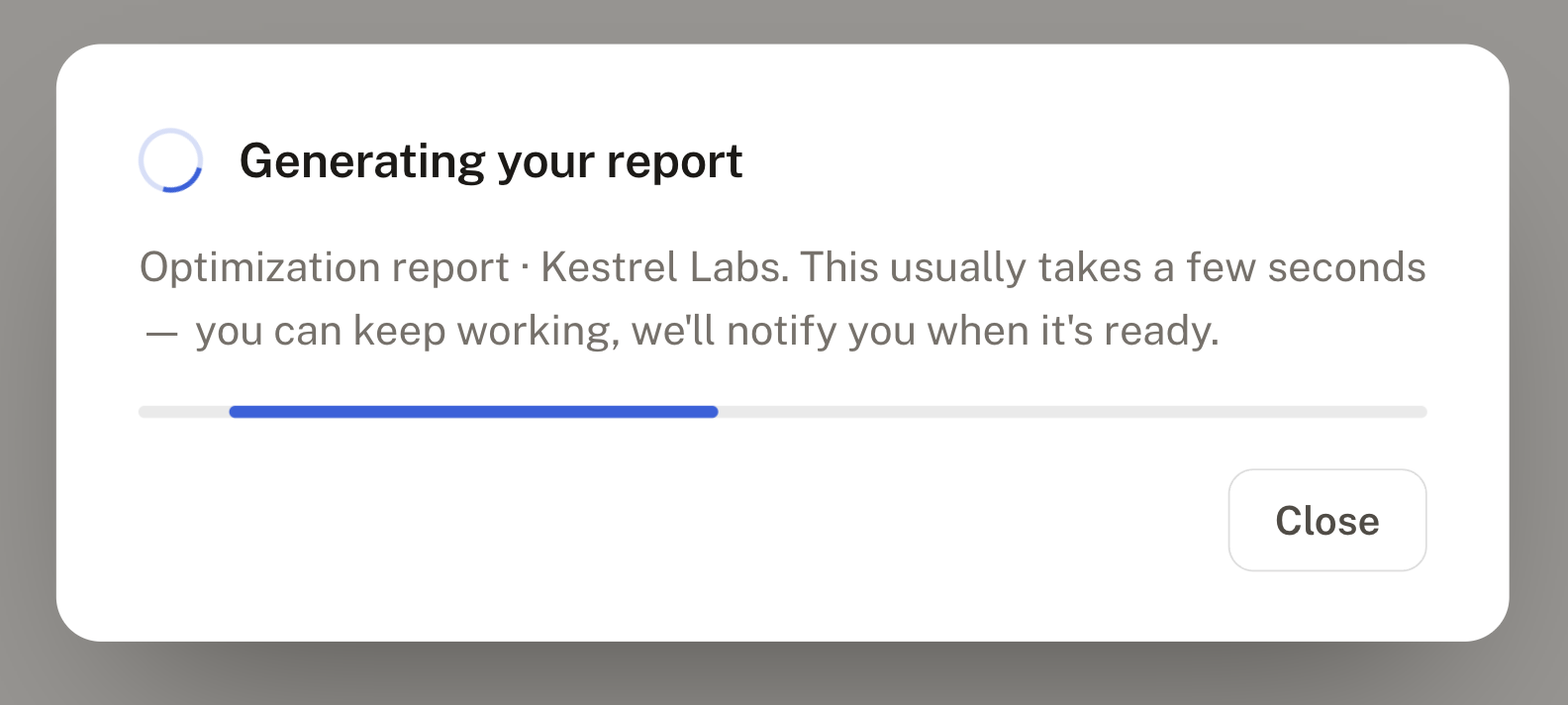
The second feature is a status modal for report generation. The user buys an optimization report, the backend generates it asynchronously (usually a few seconds, occasionally longer), and the modal shows live status until it's done.
The interesting part is how differently this stream is shaped from the notifications one, even though both use SSE.
Two frame types, but different
- Initial frame — no
event:field,data:carries the full current status. Sent immediately on connect. This covers the race where generation finished before the modal even opened: instead of waiting a poll cycle to notice, the client gets the current state in the first frame. - Live frames —
event: status,data:carries only{ charge_id, status }. Announces a transition; the client must call the REST endpoint to fetch the full detail.
When the charge reaches a terminal state (ready, failed, refunded, partially_refunded), the server closes the connection. This stream has a natural end.
The hook
const MAX_RECONNECT_ATTEMPTS = 1
const RECONNECT_DELAY_MS = 2_000

function useChargeStatusStream(chargeId: string | undefined) {
  const queryClient = useQueryClient()

  useEffect(() => {
    if (!chargeId) return

    let attempt = 0
    let reconnectTimer: ReturnType<typeof setTimeout> | undefined
    const abort = new AbortController()
    const key = ["reports", "charge-status", chargeId]

    const connect = async () => {
      try {
        await fetchEventSource(`/reports/${chargeId}/status/stream`, {
          signal: abort.signal,
          openWhenHidden: true,
          headers: { Authorization: `Bearer ${await getAccessToken()}` },
          onmessage: (event) => {
            if (!event.event) {
              // initial frame: full payload, write it straight into the cache
              queryClient.setQueryData(key, JSON.parse(event.data))
            } else if (event.event === "status") {
              // live frame: transition only, refetch to get the full detail
              queryClient.invalidateQueries({ queryKey: key })
            }
          },
          onerror: (err) => {
            throw err
          },
        })
      } catch {
        queryClient.invalidateQueries({ queryKey: key })
        if (attempt < MAX_RECONNECT_ATTEMPTS) {
          attempt += 1
          reconnectTimer = setTimeout(connect, RECONNECT_DELAY_MS)
        }
      }
    }

    connect()

    return () => {
      abort.abort()
      if (reconnectTimer) clearTimeout(reconnectTimer)
    }
  }, [chargeId, queryClient])
}
Notice the hook returns void. The component doesn't need to know the stream's connection state — it reads everything from the existing useChargeStatusQuery(chargeId) hook, which is powered by the same cache key the stream writes into. The stream is just plumbing.
Cache strategy — direct write vs invalidate
The two frame types map to two different cache updates:
- Initial frame carries the full payload →
setQueryData(key, payload). Instant, no request. - Live frame carries only the transition →
invalidateQueries(key). TriggersuseChargeStatusQueryto refetch and hydrate the full detail.
This is the opposite trade-off from the notifications stream. Notifications are self-contained, so direct write wins. Charge status transitions are announcements, so invalidate-and-refetch wins.
Contrast with the notifications stream
Both use the same building blocks — fetchEventSource, a useEffect, a TanStack Query cache — but the choices around them diverge:
| Axis | Notifications (persistent) | Charge status (ephemeral) |
|---|---|---|
| Lifecycle | Opens on workspace mount, lives for the whole session | Opens per charge, closes when the charge is terminal |
| Reconnect | Unlimited, backoff [1s, 2s, 5s, 10s], counter resets on onopen | Max 1 attempt, fixed 2s, counter never resets |
| Cache strategy | Direct write — SSE payload is complete | Initial → setQueryData; live → invalidateQueries |
| Hook returns | { status } — the UI surfaces the connection state | void — the component reads from an existing query |
| Terminal state | None — there is no "job done" | Server closes; the cache reflects the final status |
Same tool, different shape. The shape follows what the feature actually needs.
Three mental models to hold on to
Why SSE is one-way
HTTP responses flow in one direction, server → client, by nature. There's no channel within SSE for the client to talk back. If the client needs to send something, it does what any HTTP client does: fire a separate request. Trying to make SSE bidirectional means fighting the shape of the underlying transport — at that point, reach for WebSocket.
Why SSE only supports text
The spec defines the stream as newline-delimited text fields — event:, data:, id:, retry:. Binary can be shoehorned in via Base64, but that's a workaround, not native support. If binary streaming is a core requirement of the feature you're building, take it as a signal to pick a different tool.
Who recovers missed messages
Three sensible choices, depending on what the stream carries:
- Replay missed events — chat messages, audit logs, workflow transitions. Each event matters on its own, so gaps are unacceptable.
- Send a fresh snapshot — badge counts, live prices, job statuses. Only the latest value matters; replaying old ones would just be noise.
- Ignore
Last-Event-ID— the client already reconciles some other way (e.g. a REST refetch on reconnect, like my notifications stream).
Wrapping up
SSE fits naturally into TanStack Query's mental model. Each frame is either an update or an invalidation you push into the cache; consumers can't tell — and shouldn't need to tell — whether a piece of data arrived via REST or via stream. Whether to write directly or invalidate-and-refetch is a function of what the payload contains, not of how it arrived.
The two case studies above use the same building blocks but end up looking quite different. That's a feature of the design, not a bug: a persistent stream and an ephemeral one have different failure modes, and the code should say so.
References
- MDN — Using server-sent events
- WHATWG HTML — Server-sent events
@microsoft/fetch-event-source— SSE client that supports custom headers- TanStack Query —
setQueryDataandinvalidateQueries